Skip to content

Blog

It All Depends

It all depends.. it really does. On shared libraries.. interpreters.. pkg-config providers and packages. It’s the same story for all “package managers”, how do we ensure that the installed software has everything it needs at runtime?

Our merry crew has been involved in designing and building Linux distributions for a very, very long time, so we didn’t want to simply repeat history.

Using updated moss

Thanks to many improvements across our codebase, including moss-deps, we automatically analyse the assets in a package (rapidly too) to determine any dependencies we can add without requiring the maintainer to list them. This is similar in nature to RPM’s behaviour.

As such we encode dependencies into our (endian-aware, binary) format which is then stored in the local installation database. Global providers are keyed for quick access, and the vast majority of packages will not explicitly depend on another package’s name, rather, they’ll depend on a capability or provider. For subpackage dependencies that usually depend on “NEVRA” equality (i.e. matching against a name with a minimum version, release, matching epoch and architecture), we’ll introduce a lockstep dependency that can only be resolved from its origin source (repo).

Lastly, we’ll always ensure there is no possibility for “partial update” woes. With these considerations, we have no need to support >= style dependencies, and instead rely on strict design goals and maintainer responsibility.

The rapid move we’re enjoying from concept, to prototype, and soon to be fully fledged Linux distribution, is only possible with the amazing community support. The last few months have seen us pull off some amazing feats, and we’re now executing on our first public milestones. With your help, more and more hours can be spent getting us ready for release, and would probably help to insulate my shed office! (Spoiler: its plastic and electric heaters are expensive =))

We have created our initial milestones that our quite literally our escape trajectory from bootstrap to distro. We’re considerably closer now, hence this open announcement.

Our first release medium will be a systemd-nspawn compatible container image. Our primary driver for this is to allow us to add encapsulation for our build tool, boulder, permitting us to create distributable builder images to seed our infrastructure and first public binary repository.

Once our build infra is up and running (honestly a lot of work has been completed for this in advance) we’ll work towards our first 0.1 image. This will initially target VM usage, with a basic console environment and tooling (moss, boulder, etc).

We have a clear linear path ahead of us, with each stage unlocking the next. During the development of v0.0 and v0.1 we’ll establish our build and test infrastructure, and begin hosting our package sources and binaries. At this point we can enter a rapid development cycle with incremental, and considerable improvements. Such as a usable desktop experience and installer.. :)

I haven’t blogged in quite a while, as I’ve been deep in the trenches working on our core features. As we’ve expressed before, we tend to work on the more complex systems first and then glue them together after to form a cohesive hole. The last few days have involved plenty of glue, and we now have distinct package management features.

  • Replaced defunct InstallDB with reusable MetaDB for local installation of archives as well as forming the backbone of repository support.
  • Added ActivePackagesPlugin to identify installed packages
  • Swapped non cryptographic hash usage with xxhash
  • Introduced new Transaction type to utilise a directed acyclical graph for dependency solving.
  • Reworked moss-deps into plugins + registry core for all resolution operations.
  • Locally provided .stone files handled by CobblePlugin to ensure we depsolve from this set too.
  • New Transaction set management for identifying state changes and ensuring full resolution of target system state.
  • Shared library and interpreter (DT_INTERP) dependencies and producers automatically encoded into packages and resolved by depsolver.

We handle locally provided .stone packages passed to the install command identically to those found in a repository. This eliminates a lot of special casing for local archives and allows us to find dependencies within the provided set, before looking to the system and the repositories.

Install

Dependency resolution is performed now for our package installation and is validated at multiple points, allowing a package like nano to depend on compact automatic dependencies:

Dependency(DependencyType.SharedLibraryName, "libc.so.6(x86_64)");

Note our format and database are binary and endian aware. The dependency type only requires 1 byte of storage and no string comparisons.

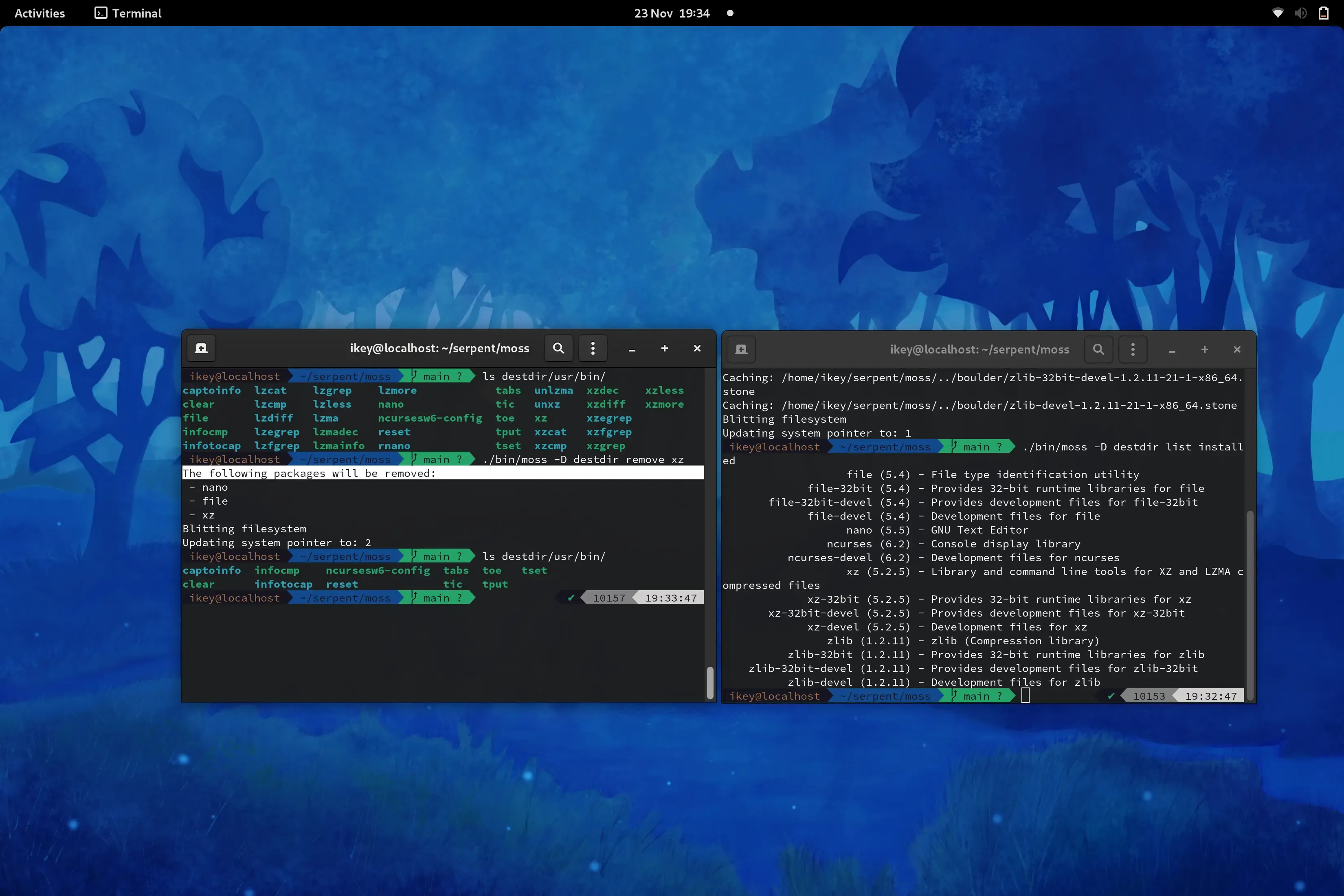
Thanks to the huge refactor, we can now trivially access the installed packages as a list. This code will be reused for a list available command in future.

Example list installed output:

file (5.4) - File type identification utility
file-32bit (5.4) - Provides 32-bit runtime libraries for file
file-32bit-devel (5.4) - Provides development files for file-32bit
file-devel (5.4) - Development files for file
nano (5.5) - GNU Text Editor

ListInstalled

For debugging and development purposes, we’ve moved our old “info” command to a new “inspect” command to work directly on local .stone files. This displays extended information on the various payloads and their compression stats.

For general users - the new info command displays basic metadata and package dependencies.

Info

Upon generating a new system state, “removed” packages are simply no longer installed. As such no live mutation is performed. As of today we can now request the removal of packages from the current state, which generates a new filtered state. Additionally we remove all reverse dependencies, direct and transitive. This is accomplished by utilising a transposed copy of the directed acyclical graph, identifying the relevant subgraph and occluding the set from the newly generated state.

Remove

The past few weeks have been especially enjoyable. I’ve truly had a fantastic time working on the project and cannot wait for the team and I to start offering our first downloads, and iterate as a truly new Linux distribution that borrows some ideas from a lot of great places, and fuses them into something awesome.

Keep toasty - this train isn’t slowing down.

Performance Corner: Faster Builds, Smaller Packages

Performance Corner is a new series where we highlight to you some changes in Serpent OS that may not be obvious, but show a real improvement. Performance is a broad term that also covers efficiency, so things like making files smaller, making things faster or reducing power consumption. In general things that are unquestionably improvements with little or no downside. While the technical details may be of interest to some, the main purpose is to highlight the real benefit to users and/or developers that will make using Serpent OS a more enjoyable experience. Show me the numbers!

Here we focus on a few performance changes Ikey has been working on to the build process that are showing some pretty awesome results! If you end up doing any source builds, you’ll be thankful for these improvements. Special thanks to ermo for the research into hash algorithms and enabling our ELF processing.

When measuring changes, it’s always important to know where you’re starting from. Here are some results from a recent glibc build, but before these latest changes were incorporated.

Payload: Layout [Records: 5441 Compression: Zstd, Savings: 83.13%, Size: 673.46 KB]
Payload: Index [Records: 2550 Compression: Zstd, Savings: 55.08%, Size: 247.35 KB]
Payload: Content [Records: 2550 Compression: Zstd, Savings: 81.46%, Size: 236.72 MB]
==> 'BuildState.Build' finished [4 minutes, 6 secs, 136 ms, 464 μs, and 7 hnsecs]
==> 'BuildState.Analyse' finished [21 secs, 235 ms, 300 μs, and 2 hnsecs]
==> 'BuildState.ProducePackages' finished [25 secs, 624 ms, 996 μs, and 8 hnsecs]

The build time is a little high, but a lot of that is due to a slow compiler on the host machine. But analysing and producing packages was also taking a lot longer than it needed to.

In testing an equivalent build outside of boulder, the build stages were about 5% faster. Testing under perf, the jobs system was a bit excessive for the needs of boulder, polling for work when we already know the times when parallel jobs would be useful. Removing moss-jobs allowed for simpler codepaths using multiprocessing techniques from the core language. This work is integrated in moss-deps and the excess overhead of the build has now been eliminated.

Before:
==> 'BuildState.Build' finished [4 minutes, 6 secs, 136 ms, 464 μs, and 7 hnsecs]
==> 'BuildState.Analyse' finished [21 secs, 235 ms, 300 μs, and 2 hnsecs]
After:
[Build] Finished: 3 minutes, 53 secs, 386 ms, 306 μs, and 4 hnsecs
[Analyse] Finished: 8 secs, 136 ms, 22 μs, and 8 hnsecs

The new results reflect a 26s reduction in the overall build time. But only 13s of this relates to the moss-jobs removal. The other major change is making the analyse stage parallel in moss-deps (a key part of why we wanted parallelism to begin with). Decreasing the time from 21.2s to 8.1s is a great achievement despite it doing more work as we’ve also added ELF scanning for dependency information in-between these results.

One of the unique features in moss is using hashes for file names which allows full deduplication within packages, the running system, previous system roots and for source builds with boulder. Initially this was hooked up using sha256, but it was proving to be a bit of a slowdown.

Enter xxhash, the hash algorithm by Yann Collet for use in fast decompression software such as lz4 and zstd (and now in many places!). This is seriously fast, with the potential to produce hashes faster than RAM can feed the CPU. The hash is merely used as a unique identifier in the context of deduplication, not a cryptographic verification of origin. XXH3_128bit has been chosen due to it having an almost zero probability of a collision across 10s of millions of files.

The benefit is actually two-fold. First of all, the hash length is halved from sha256, so there’s savings in the package metadata. This shouldn’t be understated as hash data is generally not as compressible as typical text and there are packages with a lot of files! Here the metadata for the Layout and Index payloads has reduced by 232KB! That’s about a 25% reduction with no other changes.

Before:
Payload: Layout [Records: 5441 Compression: Zstd, Savings: 83.13%, Size: 673.46 KB]
Payload: Index [Records: 2550 Compression: Zstd, Savings: 55.08%, Size: 247.35 KB]
After:
Payload: Layout [Records: 5441 Compression: Zstd, Savings: 86.66%, Size: 522.97 KB]
Payload: Index [Records: 2550 Compression: Zstd, Savings: 60.02%, Size: 165.75 KB]

Compressed this turns out to be about a 89KB reduction in the package size. For larger packages, this probably doesn’t mean much but could help a lot more with delta packages. For deltas, we will be including the full metadata of the Layout and Index payloads, so the difference will be more significant there.

The other benefit of course is the speed and the numbers speak for themselves! A further 6.4s reduction in build time removing most of the delay at the end of the build for the final package. This will also improve speeds for caching or validating a package.

Before:
==> 'BuildState.Analyse' finished [21 secs, 235 ms, 300 μs, and 2 hnsecs]
After:
[Analyse] Finished: 1 sec, 688 ms, 681 μs, and 8 hnsecs

With these changes combined, building packages can take 12x less time in the analyse stage, while reducing the size of the metadata and the overall package. We do expect the analyse time to increase in future as we add more dependency types, debug handling and stripping, but with the integrated parallel model, we can minimize the increase in time.

Building

The first installment of Performance Corner shows some great wins to the Serpent OS tools and architecture. This is just the beginning and there will likely be a follow up soon (you may have also noticed that it takes too long to make the packages), and there’s a couple more tweaks to further decrease the size of the metadata. Kudos to Ikey for getting these implemented!

Optimal File Locality

File locality in this post refers to the order of files in our content payload. Yes that’s right, we’re focused on the small details and incremental improvements that combined add up to significant benefits! All of this came about from testing the efficiency of content payload in moss-format and how well it compared against a plain tarball. One day boulder was looking extremely inefficient and then retesting the following day was proving to be extremely efficient without any changes made to boulder or moss-format. What on Earth was going on?

To test the efficiency our content payload, the natural choice was to compare it to a tarball containing the same files. When first running the test the results were quite frankly awful! Our payload was 10% larger than the equivalent tarball! It was almost unbelievable in a way, so the following day I repeated the test again only this time the content payload was smaller than the tarball. This didn’t actually make sense, I made the tarball with the same files, but only changed the directory it was created from. Does it really matter?

Of course it does (otherwise it would be a pretty crappy blog post!). When extracting a .stone package it creates two directories, mossExtract where the sha256sum named files are stored and mossInstall where those files are hardlinked to their full path name. The first day I created the tarball from mossInstall and the second day I realised that creating the tarball from mossExtract would provide the closest match to the content payload since it was a direct comparison. When compressing the tarballs to match the .stone compression level, the tarball compressed from mossInstall was 10% smaller, despite the uncompressed tarball being slightly larger.

Compression Wants to Separate Apples and Oranges

Section titled “Compression Wants to Separate Apples and Oranges”

In simplistic terms, the way compression works is comparing data that it’s currently reading versus data that it’s read earlier in the file. zstd has some great options like --long that increases the distance in which these matches can be made at the cost of increased memory use. To limit memory use while making compression and decompression fast, it takes shortcuts that reduce the compression ratio. For optimal compression, you want files that are most similar to each other to be as close as possible. You won’t get as many matches from a text file to an ELF file as you would from a similar looking text file.

Files in mossExtract are listed in their sha256sum order, which is basically random, where files in mossInstall are ordered by their path. Sorting files by path actually does some semblance of sorting where binaries are in /usr/bin and libraries are in /usr/lib bringing them closer together. This is in no way a perfect order, but is a large improvement on a random order (up to 10% in our case!).

Our glibc package has been an interesting test case for boulder, where an uncompressed tarball of the install directory was just under 1GB. As boulder stores files by their sha256sum, it is able to deduplicate files that are the same even when the build hasn’t used symlinks or hardlinks to prevent the wasted space. In this case, the deduplication reduced the uncompressed size of the payload by 750MB alone (that’s a lot of duplicate locale data!). In the python package, it removes 1,870 duplicate cache files to reduce the installation size.

As part of the deduplication process boulder would sort files by sha256sum to remove duplicate hashes. If two files have the same sha256sum, then only one copy needs to be stored. It also felt clean with the output of moss info looking nice where the hashes are listed in alphabetical order. But it was having a significant negative impact on package sizes so that needed to be addressed by resorting the files by path order (a simple one-liner), making the content payload more efficient than a tarball once again.

Compression Levelsha256sum OrderFile path Order
172,724,38970,924,858
665,544,32263,372,056
1249,066,50544,039,782
1645,365,41540,785,385
1926,643,33424,134,820
2216,013,04815,504,806

Testing has shown that higher compression levels (and enabling --long) is more forgiving of a suboptimal file order (3-11% smaller vs only 2-5% smaller when using --long). The table above is without --long so the difference is larger.

There’s certainly something to this and sorting by file order is a first step. In future we can consider creating an efficient order for files to improve locality. Putting all the ELF, image or text files together in the payload will help to shave a bit off our package sizes at only the cost to sort the files. However, we don’t want to go crazy here, the biggest impact on reducing package sizes will be using deltas as the optimal package delivery system (and there will be a followup on this approach shortly). The moss-format content payload is quite simple and contains no filenames or paths in it. Therefore it’s effectively costless to switch around the order of files, so we can try out a few things and see what happens.

To prove the value of moss-format and the content payload, I tried out some crude sorting methods and their impact on compression for the package. As you want similar files chunked together, it divided the files into 4 groups, still sorted by their path order in their corresponding chunk:

  • gz: gzipped files
  • data: non-text files that weren’t ELF
  • elf: ELF files
  • text: text files (bash scripts, perl etc)

Path order vs optimal order

As the chart shows, you can get some decent improvements from reordering files within the tarball when grouping files in logical chunks. At the highest compression level, the package is reduced by 0.83% without any impact on compression or decompression time. In the compression world, such a change would be greatly celebrated!

Also important to note was that just moving the gzipped files to the front of the payload was able to capture 40% of the size improvement at high compression levels, but had slightly worse compression at levels 1-4. So simple changes to the order (in this case moving non-compressible files to the edge of the payload) can provide a reduction in size at the higher levels that we care about. We don’t want to spend a long time analyzing files for a small reduction in package size, so we can start off with some basic concepts like this. Moving files that don’t compress a lot such as already compressed files, images and video to the start of payload meaning that the remaining files are closer together. We also need to test out a broader range of packages and the impact any changes would have on them.

So ultimately the answer to the original question (was moss-format efficient?), the answer is yes! While there are some things that we still want to change to make it even better, in its current state package creation time was faster and overheads were lower than with compressing an equivalent tarball. The compressed tarball at zstd -16 was 700KB larger than the full .stone file (which contains a bit more data than the tarball).

The unique format also proves its worth in that we can make further adjustments to increase performance, reduce memory requirements and reduce package sizes. What this experiment shows is that file order really does matter, but using the basic sorting method of filepath gets you most of the way there and is likely good enough for most cases.

Here are some questions we can explore in future to see whether there’s greater value in tweaking the file order:

  • Do we sort ELF files by path order, file name or by size?
  • Does it matter the order of chunks in the file? (i.e. ELF-Images-Text vs Images-Text-ELF)
  • How many categories do we need to segregate and order?
  • Can we sort by extension? (i.e. for images, all the png files will be together and the jpegs together)
  • Do we simply make a couple of obvious changes to order and leave zstd to do the heavy lifting?

Unpacking the Build Process: Part 2

Part 2 looks at the core of the build process, turning the source into compiled code. In Serpent OS this is handled by our build tool boulder. It is usually the part of the build that takes the longest, so where speed ups have the most impact. How long it takes is largely down to the performance of your compiler and what compile flags you are building with.

This post follows on from Part 1.

The steps for compiling code are generally quite straight-forward:

  • Setting up the build (cmake, configure, meson)
  • Compiling the source (in parallel threads)
  • Installing the build into a package directory

This will build software compiled against packages installed on your system. It’s a bit more complicated when packaging as we first set up an environment to compile in (Part 1). But even then you have many choices to make and each can have an impact on how long it takes to compile the code. Do you build with Link Time Optimizations (LTO) or Profile Guided Optimizations (PGO), do you build the package for performance or for the smallest size? Then there’s packages that benefit considerably from individual tuning flags (like -fno-semantic-interposition with python). With so many possibilities, boulder helps us utilize them through convenient configuration options.

As I do a lot of packaging and performance tuning, boulder is where I spend most of my time. Here are some key features that boulder brings to make my life easier.

  • Ultimate control over build C/CXX/LDFLAGS via the tuning key
  • Integrated 2 stage context sensitive PGO builds with a single line workload
  • Able to switch between gnu and llvm toolchains easily
  • Rules based package creation
  • Control the extraction locations for multiple upstream tarballs

boulder will also be used to generate and amend our stone.yml files to take care of as much as possible automatically. This is only the beginning for boulder as it will continue to be expanded to learn new tricks to make packaging more automated and able to bring more information to help packagers know when they can improve their stone.yml, or alert them that something might be missing.

Serpent OS is focused on the performance of produced packages, even if that means that builds will take longer to complete. This is why we have put in significant efforts to speed up the compiler and setup tools in order to offset and minimize the time needed to enable greater performance.

My initial testing focused on the performance of clang as well as the time taken to run cmake and configure. This lays the foundation for all future work in expanding the Serpent OS package archives at a much faster pace. On the surface, running cmake can be a small part of the overall build. However, it is important in that it utilizes a single thread, so is not sped up by adding more CPU cores like the compile time is. With a more compile heavy build, our highly tuned compiler can build the source in around 75s. So tuning the setup step to run in 5s rather than 10s actually reduces the overall build time by an additional 6%!

There are many smaller packages where the setup time is an even higher proportion of the overall build and becomes more relevant as you increase the numbers of threads on the builder. For example, when building nano on the host, the configure step takes 13.5s, while the build itself takes only 2.3s, so there’s significant gains to be had from speeding up the setup stage of a build (which we will absolutely be taking advantage of!).

A Closer Look at the clang Compiler’s Performance

Section titled “A Closer Look at the clang Compiler’s Performance”

A first cut of the compiler results were shared earlier in Initial Performance Testing, and given the importance to overall build time, I’ve been taking a closer look. In the post I said that "At stages where I would have expected to be ahead already, the compile performance was only equal" and now I have identified the discrepancy.

I’ve tested multiple configurations for the clang compiler and noticed that changing the default standard C++ library makes a difference to the time of this particular build. The difference in the two runs is compiling llvm-ar with the LLVM libraries of compiler-rt/libc++/libunwind or the GNU libraries of libgcc/libstdc++. And just to be clear, this is increasing the time of compiling llvm-ar with libc++ vs libstdc++ and not to do with the performance of either library. The clang compiler itself is built with libc++ in both cases as it produces a faster compiler.

Test using clangSerpent LLVM libsSerpent GNU libsHost
cmake LLVM5.89s5.67s10.58s
Compile -j4 llvm-ar126.16s112.51s155.32s
configure gettext36.64s36.98s63.55s

The host now takes 38% longer than the Serpent OS clang when building with the same GNU libraries and is much more in line with my expectations. Next steps will be getting bolt and perf integrated into Serpent OS to see if we can shave even more time off the build.

What remains unclear is whether this difference is due to something specifically in the LLVM build or whether it would translate to other C++ packages. I haven’t noticed a 10% increase in build time when performing the full compiler build with libc++ vs libstdc++.

Unpacking the Build Process: Part 1

While the build process (or packaging as it’s commonly referred to) is largely hidden to most users, it forms a fundamental and important aspect to the efficiency of development. In Serpent OS this efficiency also extends to users via source based builds for packages you may want to try/use that aren’t available as binaries upstream.

The build process can be thought of in three distinct parts, setting up the build environment, compiling the source and post build analysis plus package creation. Please note that this process hasn’t been finalized in Serpent OS so we will be making further changes to the process where possible.

Some key parts to setting up the build environment:

  • Downloading packages needed as dependencies for the build
  • Downloading upstream source files used in the build
  • Fetching and analyzing the latest repository index
  • Creating a reproducible environment for the build (chroot, container or VM for example)
  • Extracting and installing packages into the environment
  • Extracting tarballs for the build (this is frequently incorporated as part of the build process instead)

While the focus of early optimization work has been on build time performance, there’s more overhead to creating packages time than simply compiling code. Now the compiler is in a good place, we can explore the rest of the build process.

There’s been plenty of progress in speeding up the creation of the build environment such as parallel downloads to reduce connection overhead and using zstd for the fast decompression of packages. But there’s more that we can do to provide an optimal experience to our packagers.

Some parts of the process are challenging to optimize as while you can download multiple files at once to ensure maximum throughput, you are still ultimately limited by your internet speed. When packaging regularly (or building a single package multiple times), downloaded files are cached so become a one off cost. One part we have taken particular interest in speeding up is extracting and installing packages into the environment.

Eight seconds (for a small number of dependencies) that don't need to be endlessly repeated

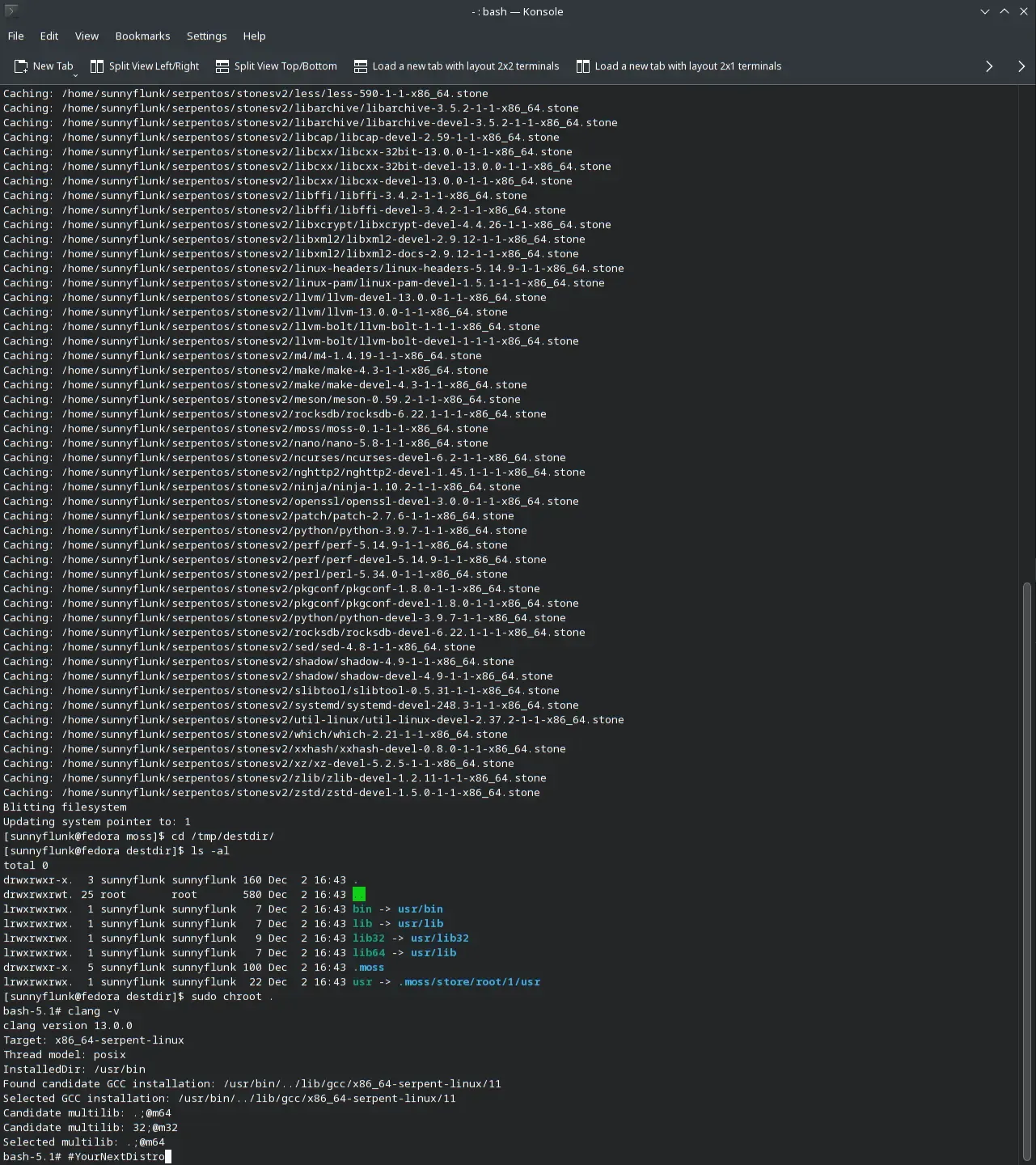
Installing packages to a clean environment can be the most time consuming part of setting up the build (excluding fetching files which is highly variable). Serpent OS has a massive advantage with the design of moss where packages are cached (extracted on disk) and ready to be used by multiple roots, including the creation of clean build environments for boulder. Having experienced a few build systems in action, setting up the root could take quite some time with a large number of dependencies (even getting over a minute). moss avoids the cost of extracting packages entirely every build by utilizing its cache!

There are also secondary benefits to how moss handles packages via its caches where disk writes are reduced by only needing to extract packages a single time. But hang on, won’t you be using tmpfs for builds? Of course we will have RAM builds as an option and there are benefits there too! When extracting packages to the RAM disk, it consumes memory which can add up to more than a GB before the build even begins. moss allows for us to start with an empty tmpfs so we can perform larger builds before exhausting the memory available on our system.

Another great benefit is due to the atomic nature of moss. This means that we can add packages to be cached as soon as they’re fetched while waiting for the remaining files to finish downloading (both for boulder and system updates). Scheduling jobs becomes much more efficient and we can have the build environment available in moments after the last file is downloaded!

moss allows us to eliminate one of the bigger time sinks in setting up builds, enabling developers and contributors alike to be more efficient in getting work done for Serpent OS. With greater efficiency it may become possible to provide a second architecture for older machines (if the demand arises).

Yes, there’s plenty more to discuss so there will be more follow up posts showing the cool features Serpent OS is doing to both reduce the time taken to build packages and in making packages easier to create so stay tuned!